
Search and Filter a SwiftUI List
Search and Filter a SwiftUI List
A small book catalog should show every book for an empty query, match titles without requiring exact case, and explain when nothing matches. Derive results from the source and query rather than destructively filtering away books.
You will learn: Attach searchable to a navigation context; bind the query; compute filtered results; preserve source identity; distinguish no matches from loading and failure.
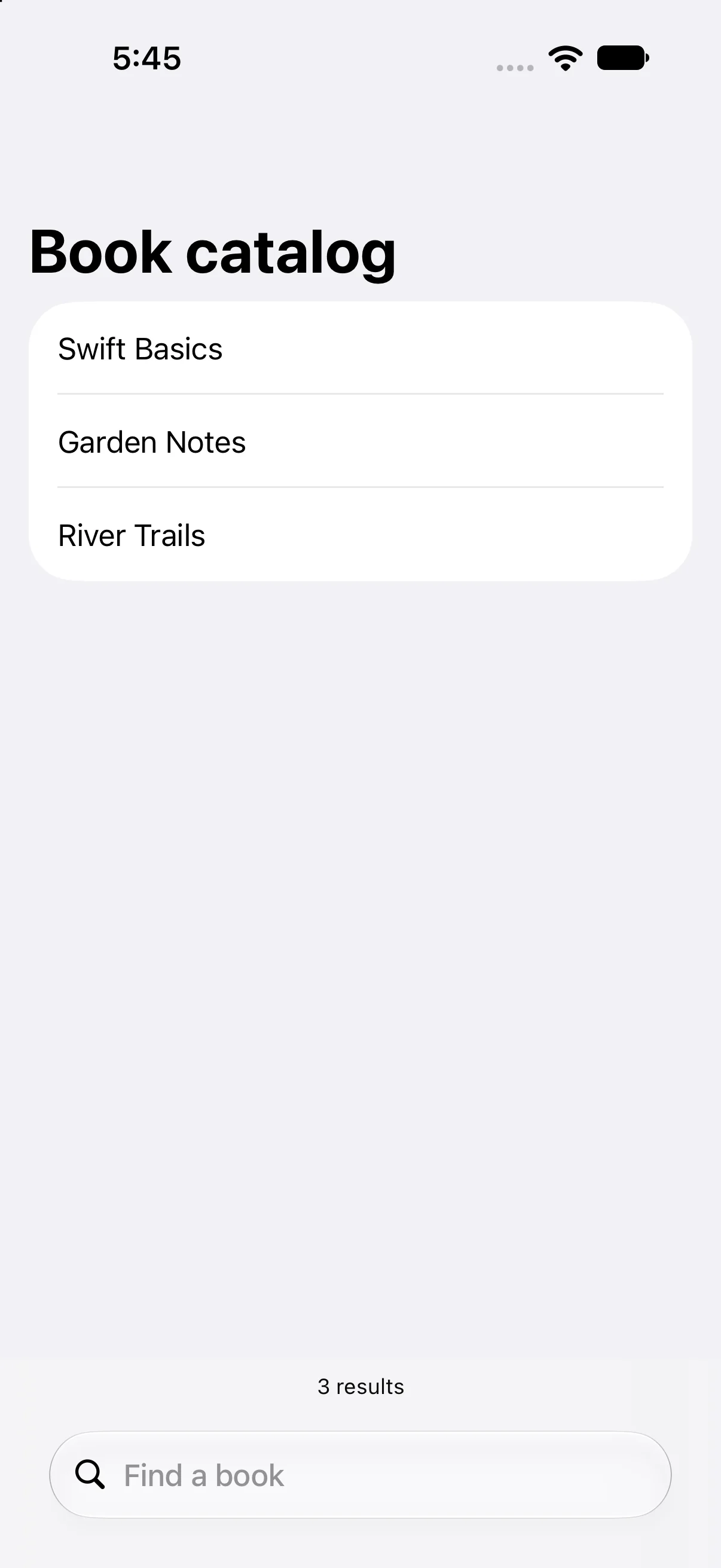
Prerequisites: the earlier SwiftUI Foundations lessons and Swift values/closures. These projects use the installed iOS SDK and local in-memory fixtures. They do not modify personal data or contact a server. The screenshot shows the initial screen before the interaction sequence.
Keep the source and query as different values
The three fixture books remain in books. query is owned @State. A computed results property trims surrounding whitespace, returns all books for an empty term and otherwise filters titles.
var results: [Book] {
    let term = query.trimmingCharacters(in: .whitespacesAndNewlines)
    return term.isEmpty ? books : books.filter {
        $0.title.localizedCaseInsensitiveContains(term)
    }
}
Case-insensitive containment is a deliberate matching policy, not universal search behavior. It is suitable for this small local example. Prefix matching, tokenization, diacritic policy, ranking and server search are separate choices. A computed filter remains easy to reason about at this fixture size; measure before using the same synchronous work for a very large dataset.
Let searchable bind the system search field
The list sits inside NavigationStack and attaches .searchable(text: $query, prompt: "Find a book"). The system supplies the search interface; typing writes to query, which changes the derived result collection.
.searchable(text: $query, prompt: "Find a book")The placement and activation of search can vary across OS and container configurations. Do not add a second independent TextField and assume both share a query unless you bind them deliberately. Search focus and search text are different pieces of presentation state.
Represent no matches as a useful outcome
When results is empty, ContentUnavailableView.search(text:) describes the empty search outcome. A bottom inset shows the current result count, derived from the same collection used by ForEach.
if results.isEmpty {
    ContentUnavailableView.search(text: query)
} else {
    ForEach(results) { Text($0.title) }
}
No matches is not a network error and does not need a retry message. This app has no network, so it also has no genuine loading state. A remote search must distinguish in-progress, successful empty, successful populated and failed states; do not use one “nothing found” label for all of them.
Preserve identity and plan the remote boundary
Filtering returns existing Book values with their original stable IDs. It does not renumber the survivors or mutate the original array. Clearing the query can therefore recover every fixture book.
For remote search, rapid query changes introduce cancellation and stale-result publication concerns. Use an explicit asynchronous policy, appropriate task lifetime and request identity before updating presentation. This local example deliberately avoids a debounce timer or service abstraction that would obscure the basic derivation.
Build the complete example
Download the BookSearch Xcode project. Open BookSearch.xcodeproj, select an installed compatible iPhone simulator, and run. The app entry point already presents ContentView. The complete ContentView.swift below is the exact built source; earlier snippets are explanatory excerpts.
import SwiftUI

struct ContentView: View {
@State private var query = ""
let books = [Book(id: 1, title: "Swift Basics"), Book(id: 2, title: "Garden Notes"), Book(id: 3, title: "River Trails")]
var results: [Book] {
 let term = query.trimmingCharacters(in: .whitespacesAndNewlines)
 return term.isEmpty ? books : books.filter { $0.title.localizedCaseInsensitiveContains(term) }
}
 var body: some View {
NavigationStack {
 List {
  if results.isEmpty {
   ContentUnavailableView.search(text: query)
  } else {
   ForEach(results) { Text($0.title) }
  }
 }.navigationTitle("Book catalog")
 .searchable(text: $query, prompt: "Find a book")
 .safeAreaInset(edge: .bottom) {
  Text("\(results.count) results").font(.caption).padding(8).frame(maxWidth: .infinity).background(.regularMaterial)
 }
}
 }
}

struct Book: Identifiable { let id: Int; let title: String }

#Preview { ContentView() }
Accessibility identifiers in the file provide stable names for local automation; they are not visible menu labels. #Preview is an editor convenience. The following screenshots come from the launched app after actual automated control interactions.
Filter titles without changing the source
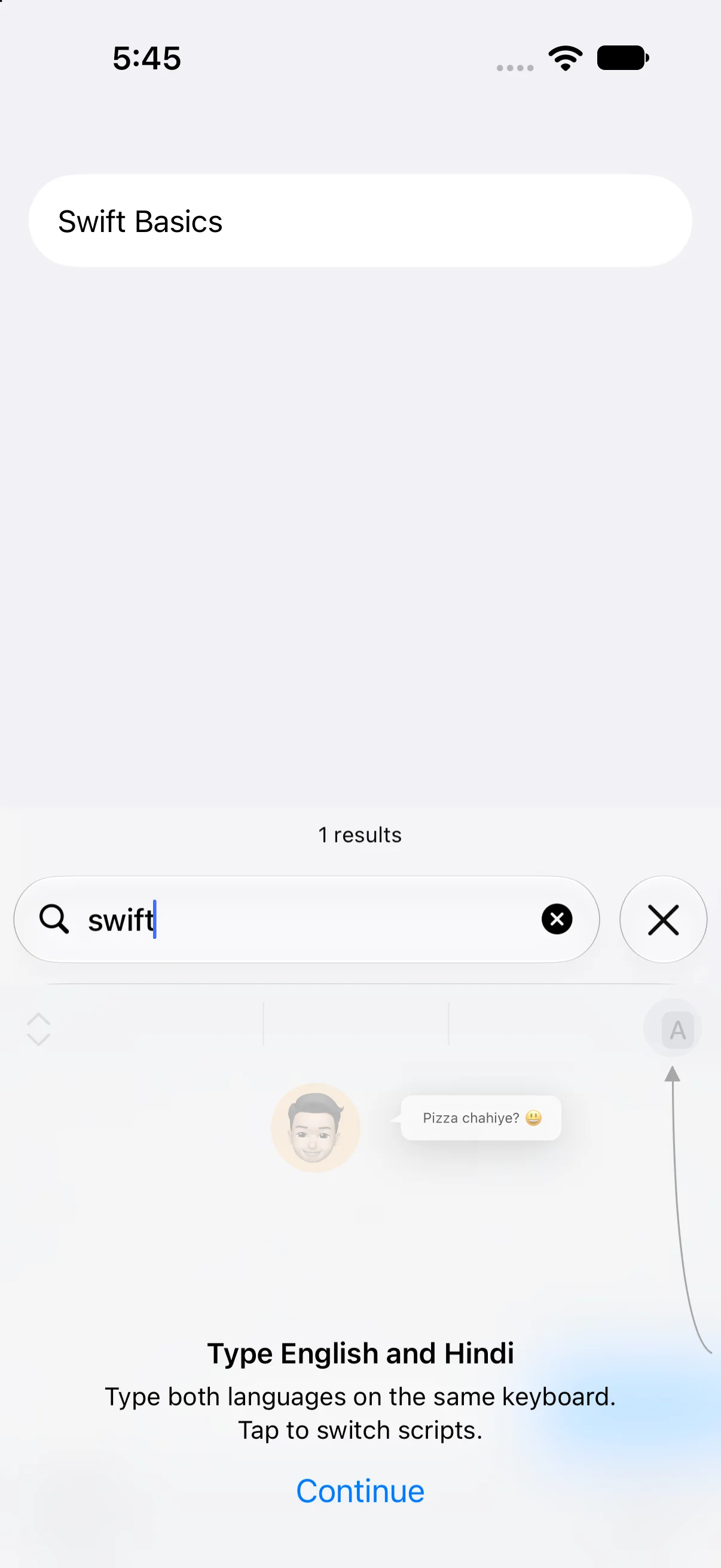
Enter swift in the real search field. Swift Basics remains and the count becomes 1 results. The lowercase query matching the capitalized title establishes the chosen case-insensitive policy. The simple count text is a fixture; a production interface should localize singular/plural formatting.
Represent a query with no matches
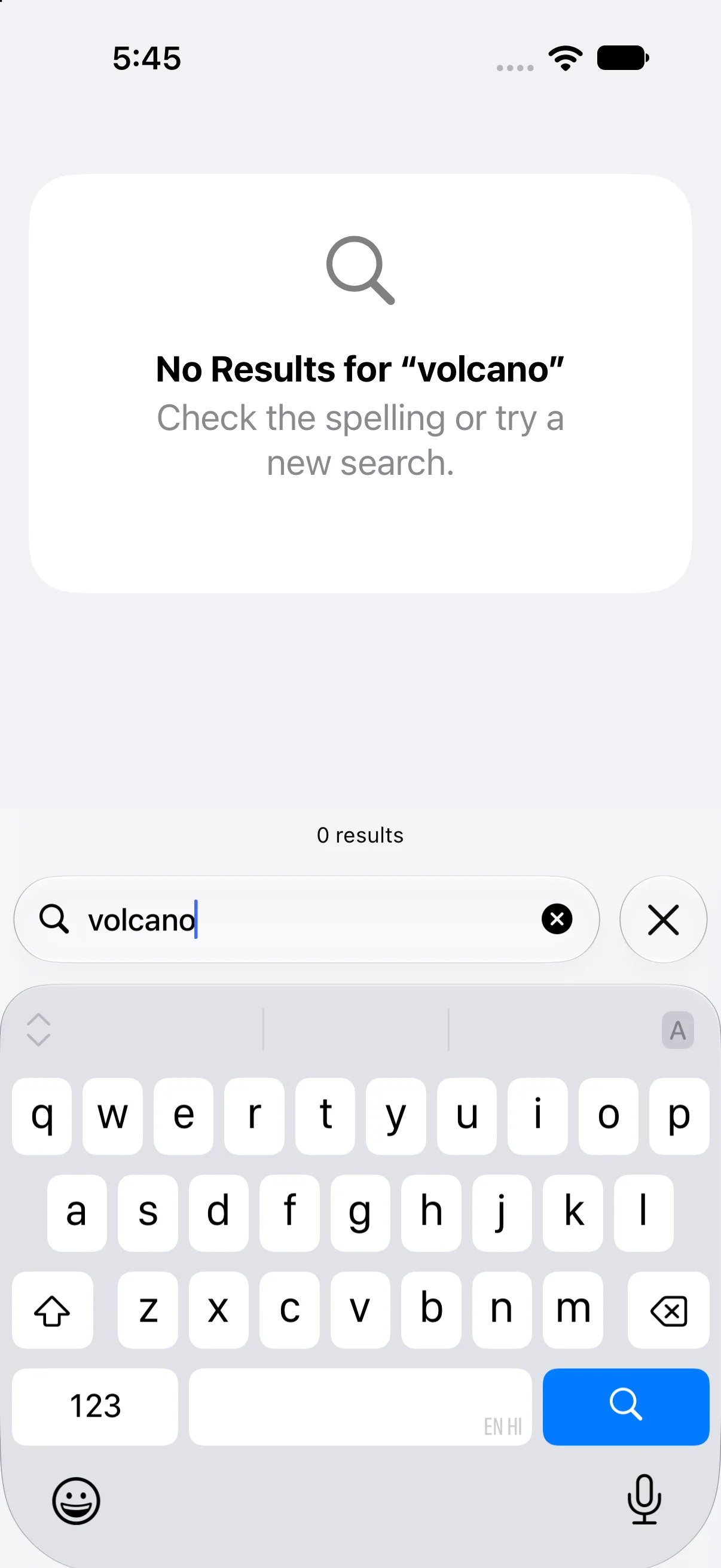
Replace the query with volcano. The system no-results view displays the query and the count becomes zero. The other books have not been deleted; clearing query should restore them.
Check a failure at the right boundary
If your output differs, compare the current input values and the relevant action before changing project settings. Save the complete source, confirm the selected scheme and destination, and inspect the first build diagnostic if compilation fails. A successful build establishes valid source; the action-result checks establish the particular UI transitions shown here.
Practice variations below are proposed changes, not additional captured states. Keep input validation, state ownership and presentation decisions explicit as you extend the project.
Try a new case and explain the result
Search for spaces only, then garden, then clear the field. Predict each collection before typing.
Worked answer
Spaces trim to an empty term, so all three books appear. garden matches Garden Notes. Clearing returns all three. If you had overwritten the original books array with each filtered result, later queries would incorrectly search only the previous subset.
Check your understanding
Choose the explanation that follows from the worked example.
What to take forward
You bound a search query, derived stable filtered rows and verified populated and empty outcomes. Next in the curriculum: explicit empty/loading/error screens before moving into observable models.
Reaching the recap and completing the quizzes are separate milestones.