
Optionals and Input Validation
Handle three kinds of address input
An apartment number can be missing, blank or useful. Build an optional address line, trace each input through validation, then compare binding, chaining and fallback.
Start with the small worked operation, follow its decisions, then open the matching complete Xcode checkpoint. It includes the exact source used for the screenshot. The examples use local fixtures so you can inspect behavior without an account or server.
Choose an absence policy for an address field
A delivery address may omit an apartment number. That absence is legitimate; it should not automatically become an error. By contrast, a required recipient name must satisfy a different rule. An optional represents presence, while validation defines whether a present value is acceptable for a particular purpose.
import Foundation
func apartmentLine(_ input: String?) -> String? {
    guard let input else { return nil }
    let number = input.trimmingCharacters(in: .whitespacesAndNewlines)
    guard !number.isEmpty else { return nil }
    return "Apartment \(number)"
}
assert(apartmentLine(nil) == nil)
assert(apartmentLine(" ") == nil)
assert(apartmentLine(" 4B ") == "Apartment 4B")
Trace the three cases. nil exits before trimming. A space is present but becomes empty after trimming and exits at the second guard. The last input produces a useful line. Returning nil intentionally omits an optional address line; throwing a required-name error expresses a different product decision.
Binding, chaining and fallback answer different questions
let line: String? = apartmentLine(" 4B ")
if let line { assert(line == "Apartment 4B") }
let length: Int? = line?.count
let label = apartmentLine(nil) ?? "No apartment specified"
assert(length == 12)
assert(label == "No apartment specified")
if let gives you a nonoptional value inside the branch. Optional chaining propagates absence through an operation and keeps the result optional. The nil-coalescing operator selects a fallback value; it does not trim or otherwise validate content. Avoid input! for routine external data: it asserts presence and can trap, while still saying nothing about whether a present string is useful.
Run the complete scenario on iPhone
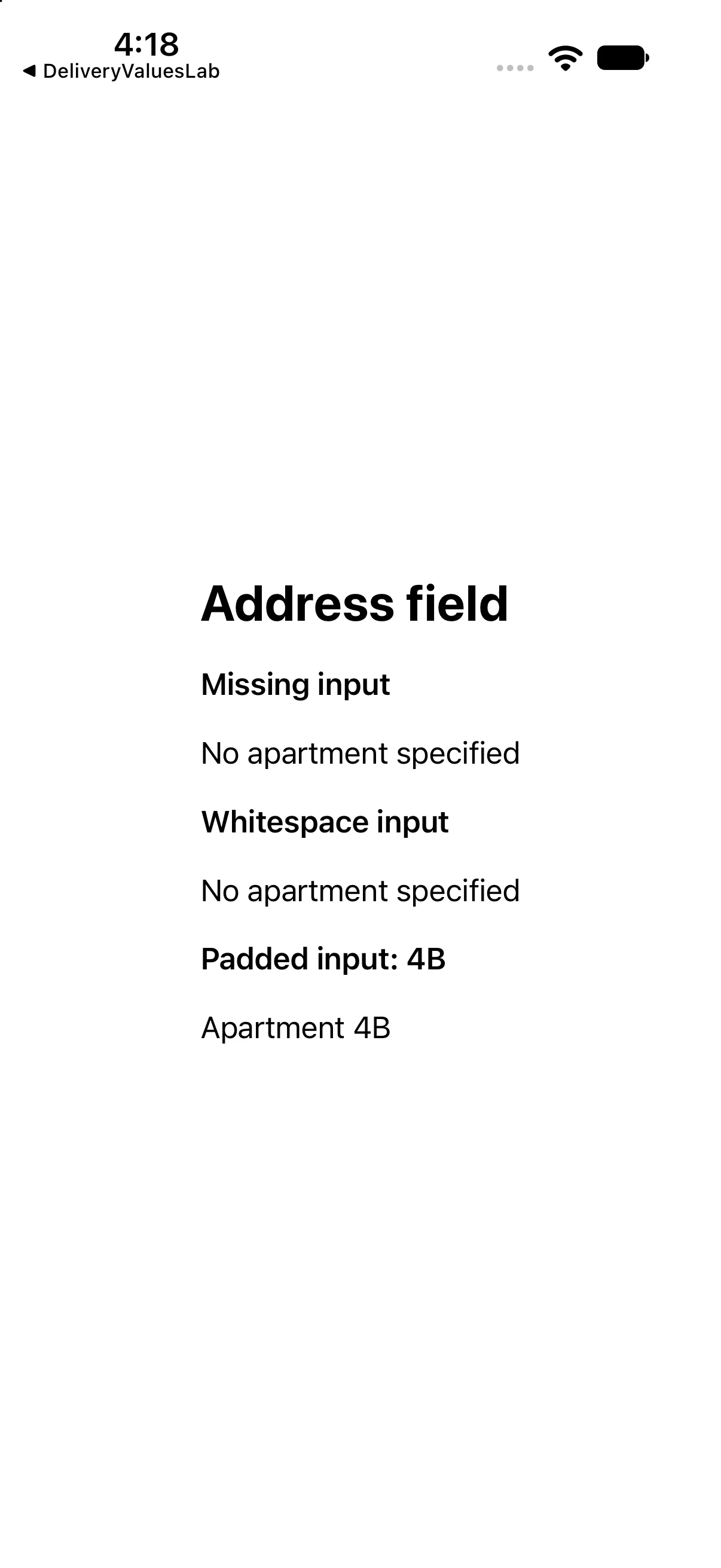
The interface below calls the operations discussed above and presents their results. This is a dedicated example for this lesson, not the greeting app used in the first revision. Replace ContentView.swift in the downloadable project with this complete source if reproducing it by hand.
import SwiftUI

func apartmentLine(_ input: String?) -> String? {
 guard let input else { return nil }
 let number = input.trimmingCharacters(in: .whitespacesAndNewlines)
 guard !number.isEmpty else { return nil }
 return "Apartment \(number)"
}

struct ContentView: View {
 var body: some View {
 VStack(alignment: .leading, spacing: 18) {
 Text("Address field").font(.title).bold()
 Text("Missing input").font(.headline)
 Text(apartmentLine(nil) ?? "No apartment specified")
 Text("Whitespace input").font(.headline)
 Text(apartmentLine("   ") ?? "No apartment specified")
 Text("Padded input: 4B").font(.headline)
 Text(apartmentLine(" 4B ") ?? "No apartment specified")
}.padding(24)
 }
}

#Preview { ContentView() }
Download this complete checkpoint project. The code above replaces ContentView.swift in this project; its app entry point is already included.
Apply the idea to a new case
Add a fourth input containing a newline and spaces. Decide whether an apartment line should appear.
Worked answer
Trimming whitespaceAndNewlines leaves an empty string, so the helper returns nil. The view supplies the fallback label; a real address UI could choose to omit the line entirely.
This exercise is a proposed change; the screenshot shows the supplied baseline. Predict the outcome before running and restore the baseline when comparing against the capture.
Explain the behavior
Choose the explanation that follows from the worked example.
What to take into the next lesson
You handled missing, blank and useful address input, then distinguished binding, chaining and fallback. Next, organize many values with collections and stable identity.
Reaching the recap and completing the quizzes are separate milestones.