
HTML Comments
HTML Comments: Invisible Helpers in Your Code
Comments in HTML are a way to add invisible notes, reminders, or instructions to your code. They don’t show up on the webpage. Instead, they live behind the scenes — guiding you, documenting your decisions, or helping other developers understand what’s going on.
Syntax of HTML Comments
The syntax is simple and easy to remember:
<!-- This is a comment -->
You open the comment with <!-- and close it with -->. Anything in between is ignored by the browser.
Why Use HTML Comments?
- Leave notes: Explain what a section of code does
- Temporarily disable code: Prevent a tag from rendering without deleting it
- Organize complex layouts: Break your page into labeled sections
Commenting in Practice
Let’s take a simple HTML example and add comments throughout:
<!DOCTYPE html>
<html>
  <head>
    <title>Comment Example</title>
  </head>
  <body>
    <!-- This is the main heading -->
    <h1>Hello World</h1>

    <!-- Displaying a list of fruits -->
    <ul>
      <li>Apple</li>
      <li>Banana</li>
      <li>Cherry</li>
    </ul>

    <!-- <p>This paragraph is commented out and won’t be shown</p> -->
  </body>
</html>
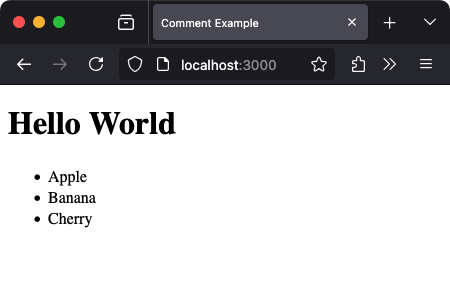
Everything between the <!-- and --> is hidden from view — but still lives in your codebase.
Using Comments to Disable HTML Temporarily
Let’s say you’re unsure whether to keep a section of text. Instead of deleting it, just comment it out:
<!-- <p>This is a draft paragraph.</p> -->
Now that code won’t render, but it's still there if you change your mind.
Commenting Around Elements
HTML comments can wrap around blocks — use them to mark large areas or groupings of code.
<!-- Start of Fruit Section -->
<section>
  <h2>My Favorite Fruits</h2>
  <ul>
    <li>Apple</li>
    <li>Banana</li>
    <li>Cherry</li>
  </ul>
</section>
<!-- End of Fruit Section -->
These comments make your code readable — especially useful when projects grow large.
Best Practices
- Be concise: Use comments to explain why, not what (the “what” should be clear from the code)
- Avoid excessive commenting: Don’t state the obvious
- Use consistent language and tone: Especially on teams
- Don’t comment sensitive data: Even if it’s hidden, it still exists in the source
What Not to Do
HTML comments should never be used to:
- Hide passwords, tokens, or confidential info
- Track users (they don’t render, so no analytics)
- Expect to secure code (it's all visible in “View Source”)
Summary
HTML comments are your quiet companions — invisible on the page, yet essential to clear communication in code. Use them to clarify your thinking, collaborate better, and revisit projects with confidence.
You’ve now seen how to:
- Write clean and correct comment syntax
- Use comments for organization and testing
- Improve your coding habits through thoughtful documentation
Check your understanding 1
Check your understanding 2
Check your understanding 3
Choose the option that lists all and only the correct statements.
- Adding notes for future edits
- Temporarily hiding HTML content
- Explaining complex markup
- Changing the document’s layout
Check your understanding 4
Check your understanding 5
Check your understanding 6
Choose the option that lists all and only the correct statements.
<!-- Add subject dropdown later --><!-- <p>Hidden note for teachers</p> -->// <!-- Not this style --><!--Wrong format-->
Next Step
In the next lesson, we’ll explore HTML Text Formatting — where you’ll learn to shape your content with bold, italic, underline, and more. It’s where structure meets style.
Reaching the recap and completing the quizzes are separate milestones.